
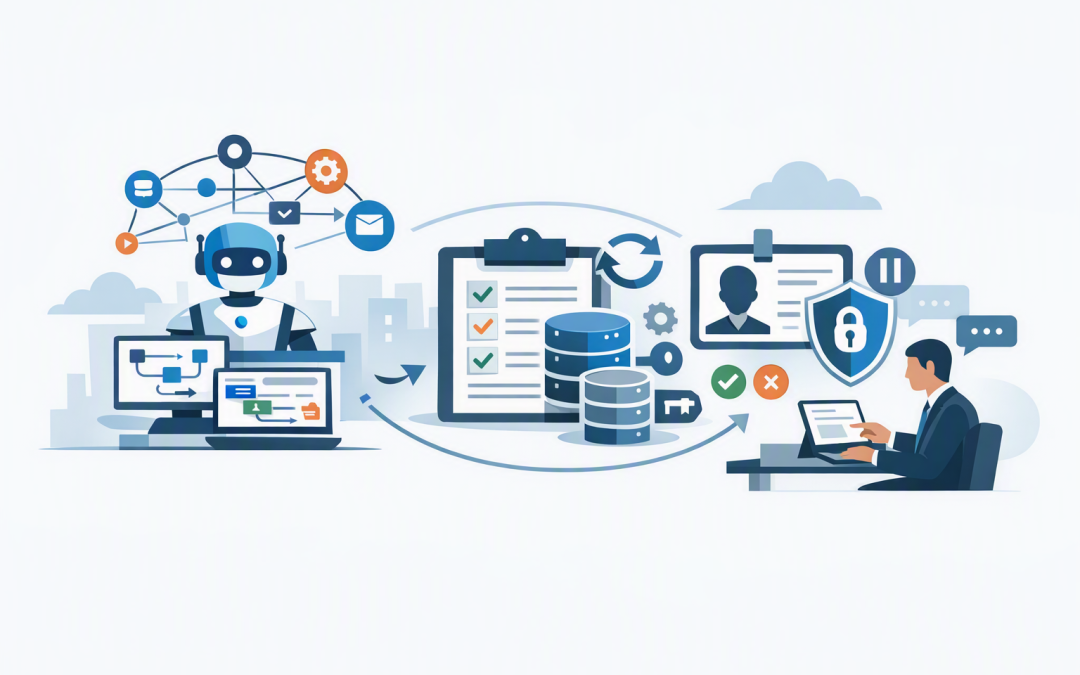
In this blog post How to Design Durable Azure AI Agents That Stay Under Control we will explain why promising AI automations often become unreliable when they move beyond a demonstration. The agent works well until an approval takes two days, an API fails halfway through, a staff member changes a record, or the same transaction is accidentally processed twice.
A durable AI agent is designed to pause, remember its progress, recover from failure and continue safely. Instead of giving an AI model complete freedom, the business surrounds it with a controlled workflow that decides what it can access, which steps must happen in order and when a person must take over.
This builds on our earlier guide to designing secure AI agent infrastructure on Azure. Here, we will focus on the four elements that make an agent dependable in day-to-day operations: orchestration, state, identity and human approval.
What technology sits behind a durable AI agent?
The AI model, such as Azure OpenAI or Anthropic Claude, is only one part of the system. It interprets information, generates content and recommends actions, but it should not be responsible for running the entire business process.
Microsoft Foundry on Azure can provide the managed environment for models, tools and agents. Microsoft Agent Framework can define how agents and software functions work together, while Azure Durable Task or Durable Functions can preserve progress, manage retries and resume long-running processes after interruptions.
Microsoft Entra ID controls identity and access. Azure Cosmos DB or another approved data store can hold business state and audit evidence. Logic Apps, Power Automate or Teams can deliver approval requests to the right employees.
The practical design principle is simple: let the AI handle interpretation and drafting, but let predictable software control access, sequencing, approvals and final actions.
1. Orchestration stops the agent from improvising the process
Orchestration is the coordination layer. Think of it as the conductor that tells each agent, application and employee when to act.
Without orchestration, an agent may decide for itself which tools to call and in what order. That flexibility can be useful during research, but it creates risk when the workflow changes customer records, creates accounts, approves refunds or sends regulated information.
A durable workflow defines clear stages. For example, an employee onboarding agent might:
- Confirm that an approved HR request exists.
- Collect the employee’s role, location and start date.
- Recommend the correct Microsoft 365 access.
- Request manager approval for sensitive permissions.
- Create the account using a controlled automation service.
- Record the result and notify HR.
The agent can reason within each stage, but it cannot skip mandatory checks. This reduces errors, makes support easier and prevents the AI from silently changing the process.
For more complex designs involving several specialist agents, our guide to durable workflows with Microsoft Agent Framework explains how responsibilities can be separated without losing central control.
2. State allows work to survive delays and failures
State is the saved record of where a workflow is, what has already happened and what still needs to happen. It is the difference between an agent that can resume tomorrow and one that starts again from the beginning.
This matters because real business processes rarely finish in a single request. An approval may take several days. A finance platform may be temporarily unavailable. A customer might provide missing information later.
There are two types of information to manage. Conversation memory helps the agent understand what has been discussed. Workflow state records confirmed business facts, completed steps, approval decisions and transaction identifiers.
These should not be treated as the same thing. A chat transcript may contain assumptions or outdated information, while workflow state must be structured, validated and suitable for an audit.
Each important step should create a checkpoint. If the system fails after preparing a purchase order but before submitting it, the workflow can restart from that checkpoint rather than repeating every model call and potentially creating a duplicate order.
Useful state typically includes:
- A unique workflow and transaction number.
- The current stage and completed stages.
- Validated inputs and their source.
- Tool calls and their outcomes.
- Approval status, approver and timestamp.
- Retry counts, expiry dates and error details.
This also supports compliance. Our article on building audit-ready AI agents with Azure Cosmos DB examines how to retain useful evidence without keeping unnecessary sensitive data forever.
3. Identity determines what the agent can actually do
An AI agent should never use a shared administrator account or credentials hidden inside its code. If that account is compromised or misused, it becomes difficult to determine which system performed the action and why.
Instead, each production agent or workload should receive a controlled identity through Microsoft Entra ID, Microsoft’s identity and access platform. Azure managed identities can then allow the application to access approved resources without storing passwords or access keys.
Permissions should follow the least-privilege principle: the agent receives only the access needed for its specific task. An invoice agent may read purchase orders and draft a payment request, but it should not be able to approve the payment or change a supplier’s bank details.
Identity design should also separate the person requesting an action, the agent preparing it and the employee approving it. This creates a clearer evidence trail and supports the access controls expected under Essential Eight, the Australian Government’s cybersecurity framework that many organisations are now required or encouraged to follow.
4. Human approval should be based on risk
Requiring approval for every AI action will frustrate employees and remove much of the productivity benefit. Requiring no approval creates unacceptable business risk.
The answer is risk-based approval. Low-risk and reversible tasks can proceed automatically, while costly, sensitive or difficult-to-reverse actions must pause for an authorised person.
IF action is read-only and uses approved data
 continue automatically
ELSE IF action changes a business record
 require owner approval
ELSE IF action involves payment, access or sensitive data
 require authorised approval and additional verification
An approval request should show what the agent intends to do, which information it used, the expected impact and what happens if the request expires. A simple Approve button without this context is not meaningful oversight.
The workflow must remain safely paused while waiting. Once the decision arrives, it should verify the approver’s identity, record the response and continue from the saved checkpoint. This is the practical control model covered in our article on how an agent harness keeps Azure AI workflows under human control.
A practical business scenario
Consider a 180-person professional services company using an AI agent to process supplier invoices. The initial demonstration reads an invoice, matches it to a purchase order and prepares a payment request in minutes.
The production risks appear when an invoice is submitted twice, the finance system times out, or the supplier’s bank account has recently changed. A basic agent may retry the entire process or submit a payment using incomplete information.
A durable design gives every invoice a unique transaction number, saves progress after each check and prevents completed steps from running twice. The agent can prepare the request, but a bank detail change or high-value payment automatically routes to an authorised finance manager.
The outcome is not merely a better AI demonstration. Finance saves time on routine invoices, duplicate-payment risk falls, sensitive changes remain under human control and the company gains a clear record for management and auditors.
Questions leaders should ask before approving production
- Can the workflow resume safely after an outage or a three-day approval delay?
- Can it detect and prevent duplicate transactions?
- Does every agent have its own controlled identity and limited permissions?
- Which actions require approval, and who is authorised to provide it?
- Can we explain what happened without relying only on a chat transcript?
- Are model usage, storage and failed retries monitored for unnecessary cost?
If the answers are unclear, the organisation has an AI experiment rather than a dependable business system.
Durability is what turns AI into useful infrastructure
Successful agents are not defined only by how intelligently they respond. They are defined by whether they can complete work reliably, protect business data, recover from failure and keep people in control of important decisions.
CloudProInc brings more than 20 years of enterprise IT experience to this problem as a Microsoft Partner and Wiz Security Integrator. Our Melbourne-based team works hands-on across Azure, Microsoft 365, OpenAI, Claude, Microsoft Defender and Wiz rather than treating the agent as an isolated AI project.
If you are not sure whether your current AI design can survive real business conditions, we are happy to review the workflow, identity and approval controls with you—no strings attached.
Discover more from CPI Consulting
Subscribe to get the latest posts sent to your email.