
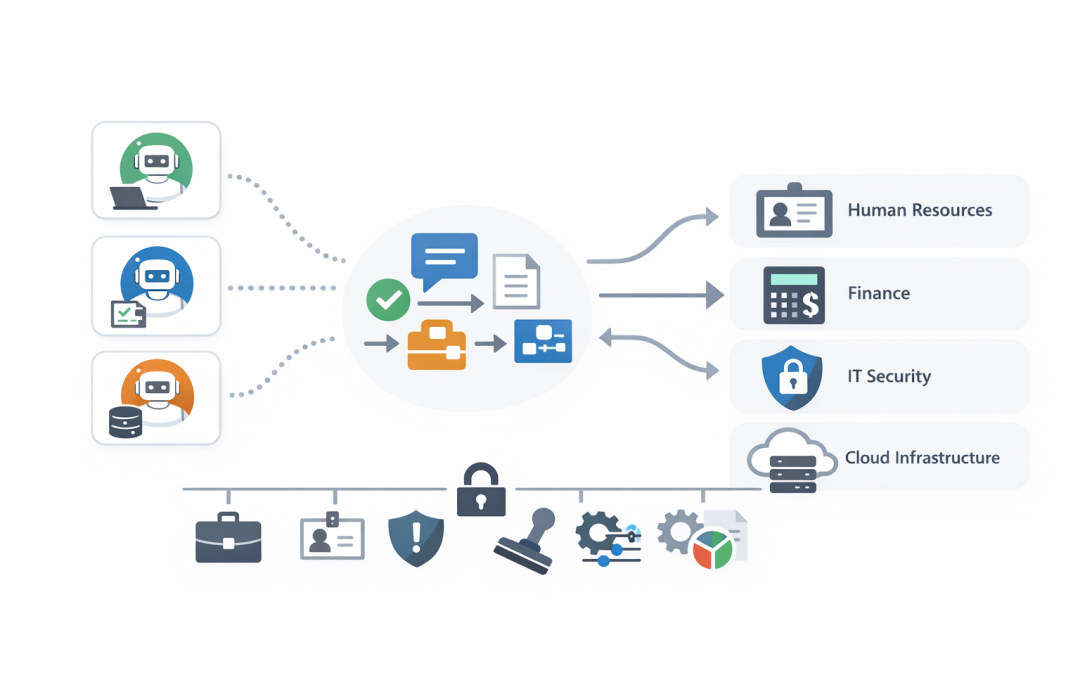
In this blog post Building Cross Platform Multi Agent Workflows with A2A Protocol we will explain how different AI agents can work together across Microsoft, cloud, security, finance, service desk, and custom business systems without creating a messy web of one-off integrations.
Most businesses are no longer asking, “Should we use AI?” They are asking a harder question: “How do we make AI useful across the business without losing control of cost, security, and data?”
That question matters because AI is quickly moving from simple chatbots to agents. An AI agent is software that can understand a goal, decide what steps are needed, use business tools, and report back with an outcome. A single agent might help with HR queries, invoice checks, cyber alerts, sales follow-ups, or IT support.
The problem starts when each agent lives in its own world. Your Microsoft agent knows Microsoft 365. Your finance agent knows your ERP. Your security agent knows Defender and Wiz. Your service desk agent knows tickets. But the business process you actually care about usually crosses all of those systems.
The high level idea behind A2A
A2A, short for Agent-to-Agent or Agent2Agent protocol, is a shared way for AI agents to talk to each other. In plain English, it gives agents a common language so they can discover what another agent can do, send it a task, receive updates, and collect the final result.
This is useful because business workflows are rarely contained inside one platform. A new employee onboarding process might involve Microsoft 365, Intune, which manages and secures company devices, Entra ID, which controls employee identity and access, payroll, HR, finance, and security checks.
Without a common protocol, every connection becomes a custom project. With A2A, each agent can publish what it does, accept work in a standard format, and return results in a way other agents understand.
We have already covered why the protocol matters for practical adoption in Why A2A Protocol Matters for Practical Business AI Adoption. This article goes a step further: how to think about cross-platform workflows where multiple agents work together safely.
Why this matters for CIOs and business leaders
The business case for multi-agent workflows is not “AI for AI’s sake.” The value comes from reducing hand-offs, shortening response times, cutting manual checking, and improving control.
Think about a common scenario: a manager asks for a new contractor to be onboarded urgently. Today, that might trigger emails between HR, IT, finance, security, and the hiring manager. Someone creates accounts. Someone checks device access. Someone approves licences. Someone forgets to remove access three months later.
A cross-platform agent workflow changes that. The HR agent confirms the worker details. The identity agent creates the account with the right access. The Intune agent checks device compliance. The security agent applies policy. The finance agent confirms cost centre approval. The manager gets one clear update.
The business outcome is simple: fewer delays, fewer mistakes, better audit trails, and less risk from over-permissioned accounts.
The main technology behind A2A in plain English
A2A is not another AI model. It does not replace OpenAI, Anthropic Claude, Microsoft Copilot, Azure AI Foundry, or your existing business applications.
Instead, A2A sits between agents as a communication layer. It defines how agents introduce themselves, how they receive tasks, how they send progress updates, and how they return outputs such as text, files, or structured data.
There are a few concepts worth understanding:
- Agent card: a digital profile that explains what an agent can do, where it can be reached, and what security is required.
- Messages: the instructions and responses passed between agents.
- Tasks: pieces of work that may take seconds, minutes, or longer to complete.
- Artifacts: the outputs of a task, such as a report, spreadsheet, recommendation, or summary.
- Authentication: the process that proves one agent is allowed to call another agent.
For decision-makers, the key point is this: A2A gives your organisation a way to build AI workflows without hard-coding every system to every other system.
A practical cross-platform workflow example
Let’s use a realistic example for a 200-person professional services firm.
The business receives sensitive client documents through email and SharePoint. Staff manually review them, classify them, create project tasks, check for privacy issues, and escalate anything unusual to legal or security. The process is slow, inconsistent, and heavily dependent on a few experienced people.
A cross-platform A2A workflow could look like this:
- A Microsoft 365 agent watches for a new client folder or approved document submission.
- A document review agent summarises the content and identifies the likely work type.
- A compliance agent checks whether personal information or sensitive business data is present.
- A security agent checks whether sharing permissions are too broad.
- A project management agent creates the right tasks for the delivery team.
- A reporting agent sends the manager a plain-English summary and any exceptions.
No single agent needs to know everything. Each agent does its specialist job, then hands the result to the next agent through a common protocol.
The business outcome is faster document triage, more consistent compliance checks, and fewer security gaps caused by manual handling.
Where Microsoft fits into the picture
For many Australian businesses, Microsoft is already the centre of day-to-day work. Staff use Outlook, Teams, SharePoint, OneDrive, Microsoft 365, Defender, Intune, and increasingly Copilot or Azure AI Foundry.
That makes Microsoft a practical place to start. A Microsoft-based agent can act as the front door for employees while specialist agents sit behind it. Those specialist agents might run in Azure, another cloud platform, a SaaS product, or a custom internal system.
For example, a user might ask in Teams, “Can we approve this supplier?” The Microsoft-facing agent can coordinate the workflow. A finance agent checks payment history. A security agent checks cyber risk. A compliance agent checks documentation. The user sees one answer, not five disconnected systems.
CloudPro Inc often recommends this pattern because it fits how people already work. You do not need to force staff into another portal just to make AI useful.
A simple technical view without the complexity
At a technical level, an A2A-enabled agent publishes an agent card. This tells other agents what it can do and how to call it.
{
 "name": "Security Review Agent",
 "description": "Reviews files, permissions, and alerts for security risk",
 "skills": [
 {
 "name": "review_supplier_document",
 "description": "Checks a supplier document for security and privacy concerns"
 }
 ],
 "url": "https://agents.example.com/security-review",
 "security": "OAuth2 required"
}
In plain English, this says: “I am the Security Review Agent. I can review supplier documents. Here is where to reach me. You must authenticate before using me.”
A workflow agent can then call that agent as part of a larger process.
When a supplier document is submitted:
 ask Compliance Agent to check privacy risk
 ask Security Review Agent to check file and access risk
 ask Finance Agent to check payment and contract status
 combine the results
 send one recommendation to the approver
This is deliberately simplified. In a production environment, you would add identity controls, logging, cost limits, error handling, approval steps, and monitoring. But the basic idea is easy to understand: one agent coordinates work across other agents.
If you want a deeper technical companion to this, our post on building interoperable AI agents with A2A and Agent Framework explains how Microsoft Agent Framework can support this type of design.
The security problem most teams underestimate
Multi-agent workflows create a new security question: if one agent can call another agent, what stops it from doing too much?
This is where many early AI projects go wrong. Teams focus on the impressive demo, but not on permissions, audit logs, data boundaries, or who is accountable when an automated workflow takes action.
For Australian organisations, this connects directly to Essential 8, the Australian government’s cybersecurity framework that many organisations are now required or expected to follow. It also connects to privacy obligations, especially where personal information is processed by AI systems.
A safe A2A design should include:
- Strong identity: every agent should have its own identity, not share a generic account.
- Least privilege access: agents should only access the systems and data they need.
- Approval gates: high-risk actions should still require a human decision.
- Logging: every agent-to-agent call should be recorded for investigation and audit.
- Data controls: sensitive data should not be passed to agents that do not need it.
- Cost controls: workflows should have limits so one bad loop does not create a large AI bill.
This is also where tools like Microsoft Defender and Wiz become important. Defender helps monitor Microsoft environments and identities. Wiz helps identify risk across cloud workloads and infrastructure. Together, they help make sure AI workflows do not become invisible security gaps.
We explored the authentication side in more depth in Implementing Secure A2A Auth in Microsoft Foundry Agent Service.
Choosing the right workflow pattern
Not every workflow should be fully automated. Some should run step-by-step. Some should run several checks at once. Some should hand off to a human. Some should stop immediately if a risk threshold is met.
For example, a low-risk IT request might be handled end-to-end by agents. A request to give a contractor access to sensitive client data should include manager approval and security review.
A good starting point is to map workflows into four groups:
- Low risk, high volume: automate heavily, such as password guidance or standard licence requests.
- Medium risk: automate checks, but keep human approval.
- High risk: use agents to gather evidence, not make the final decision.
- Regulated or sensitive: design around audit, privacy, and compliance from day one.
Our article on AI agent orchestration patterns for business leaders is a useful next read if you are deciding how agents should coordinate work.
How to start without overcommitting
The best first A2A workflow is not the most ambitious one. It is the one with a clear business owner, measurable outcome, manageable risk, and obvious manual pain.
Good candidates include:
- Employee onboarding and offboarding.
- Supplier risk checks.
- Security alert enrichment.
- Monthly reporting packs.
- IT service desk triage.
- Document classification and routing.
Before building, ask five practical questions:
- What decision or task are we trying to improve?
- Which systems are involved today?
- Where do delays, rework, or mistakes happen?
- What data should agents never see?
- How will we measure success after 30, 60, and 90 days?
That last question matters. A workflow that saves 15 minutes once a month is not worth much. A workflow that removes 20 manual checks per week, reduces access mistakes, and gives managers faster answers probably is.
What CloudPro Inc recommends
Our practical advice is to treat A2A as part of your AI architecture, not as a side experiment. It should connect to your identity strategy, security controls, cloud design, Microsoft 365 governance, and Essential 8 roadmap.
As a Melbourne-based Microsoft Partner and Wiz Security Integrator, CloudPro Inc works with organisations that want AI to be useful without becoming risky or expensive. With 20+ years of enterprise IT experience, we tend to start with the boring questions first: access, data, cost, monitoring, support, and business ownership.
That is not because we dislike innovation. It is because those are the things that decide whether an AI project survives beyond the pilot.
Final thought
A2A is important because it helps AI agents work across platforms instead of trapping value inside separate tools. For CIOs and CTOs, the opportunity is not just smarter agents. It is better-connected workflows that reduce manual effort, improve security, and make business processes easier to manage.
The safest way to begin is with one workflow, one measurable outcome, and a clear security model. Prove the value, then expand.
If you are not sure whether A2A fits your Microsoft, Azure, AI, or cybersecurity roadmap, CloudPro Inc is happy to take a look. No pressure, no jargon — just a practical conversation about where multi-agent workflows could reduce cost, risk, or wasted time in your business.
Discover more from CPI Consulting
Subscribe to get the latest posts sent to your email.