
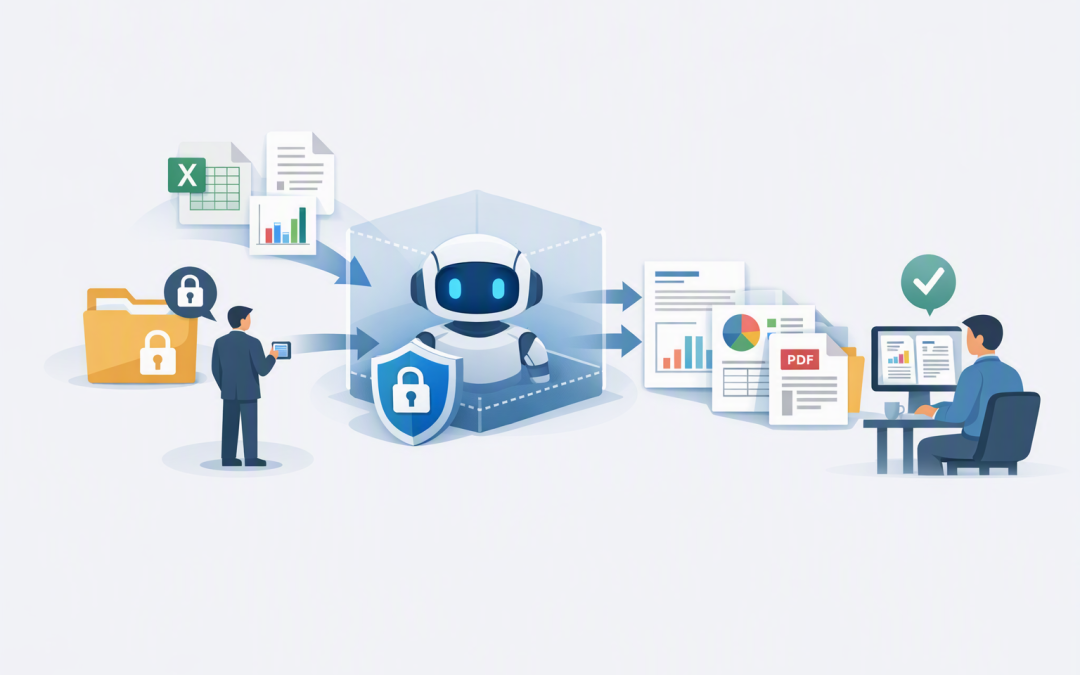
In this blog post How Filesystem Access Turns AI Into a Deliverables Engine we will explain how controlled file access allows AI to produce finished reports, spreadsheets, presentations and document packs instead of simply returning text in a chat window.


Many businesses already use AI to draft content or analyse information. The problem is that employees still spend hours copying the answer into Word, rebuilding tables in Excel, correcting presentation layouts and checking that the right version was saved.
Filesystem access closes that gap. It gives an AI agent controlled permission to read approved source files, work inside a restricted folder and save a completed deliverable in the format the business actually needs.
Why a good AI answer is not yet a business deliverable
Imagine asking an AI tool to prepare a monthly management report. It might produce a useful summary, but someone must still find the latest figures, insert them into the company template, create charts, apply the correct branding and save the final document.
The AI has helped with thinking, but it has not completed the work. For decision-makers, this distinction matters because most of the financial return from AI comes from reducing an entire process, not saving five minutes on a first draft.
Filesystem access allows the AI to interact with documents as part of a controlled workflow. It can open the approved sales spreadsheet, read a report template, create charts, assemble a PowerPoint presentation and save the result to an output folder for review.
How the technology works in plain English
The AI model itself does not normally browse through a company drive whenever it wants. A separate tool or application acts as a gatekeeper between the AI and the files.
This gatekeeper defines which folders the AI can see, which file types it can open and whether it has permission to create, change or delete anything. The process generally has five stages:
- Approved files enter a workspace. The workspace might contain an Excel workbook, a Word template, several PDFs and a set of instructions.
- The AI examines the available material. It identifies the structure, relevant information and expected output without being given access to unrelated company data.
- The AI plans the work. It decides which calculations, summaries, charts or document sections are required.
- Tools create the deliverable. A code interpreter—which lets AI safely write and run small programs—can process data and generate Word, Excel, PowerPoint, PDF or image files inside an isolated environment.
- The output is checked and released. Automated checks and, where appropriate, a human reviewer confirm that the file is accurate before it reaches customers, executives or regulators.
Some implementations use Model Context Protocol, or MCP, which is a standard way to connect an AI agent to approved tools and information. A filesystem tool can expose secure file operations while restricting the agent to configured locations.
A simplified access policy might look like this:
{
 "workspace": "/jobs/monthly-board-pack",
 "permissions": ["read-inputs", "write-outputs"],
 "blocked_locations": ["/payroll", "/production-systems"],
 "allowed_file_types": [".xlsx", ".docx", ".pptx", ".pdf"],
 "human_approval_before_release": true
}
This is an illustrative example rather than production-ready configuration. The important point is that filesystem access should mean permission to use a specific workspace—not unrestricted access to every file the organisation owns.
What AI can produce when it has controlled file access
Management and board reporting
An AI agent can combine approved financial exports, sales figures and operational metrics into a standard reporting pack. It can update charts, highlight unusual movements and draft a plain-English executive summary.
The business outcome is a shorter reporting cycle and less time spent manually transferring numbers between systems. Finance and operations teams can focus on explaining the results rather than formatting them.
Customer proposals and account reviews
The agent can read approved customer information, pricing tables and service templates before generating a first draft of a proposal or quarterly review. It can save the document using the correct naming convention and place it in a review folder.
This improves response times while keeping people responsible for pricing, promises and final approval. The goal is not to remove judgement; it is to remove repetitive document assembly.
Security and compliance evidence packs
Preparing evidence for audits can involve collecting policies, device reports, screenshots and remediation records from multiple locations. An AI workflow can organise approved evidence, identify missing items and assemble a structured review pack.
This is particularly useful for organisations working towards Essential 8, the Australian Government’s cybersecurity framework that many organisations are expected or required to follow. AI can reduce the administrative burden, but security staff should still validate whether each control is genuinely operating effectively.
Data-room deliverables
During a transaction, legal review or procurement process, AI can compare documents, create indexes and prepare issue summaries without changing the original files. This extends the controlled approach discussed in our guide to using AI agents in business data rooms.
A practical business scenario
Consider a 200-person professional services company that prepares a monthly executive pack. An analyst exports revenue data, collects project updates, copies figures into PowerPoint and spends most of a day checking charts and formatting.
With controlled filesystem access, the analyst places the approved exports and written updates into a dedicated workspace. The AI generates the charts, updates the presentation template, flags missing information and saves a draft for review.
If that reduces the process from 18 staff hours to four, the company saves 168 hours over 12 monthly reporting cycles. More importantly, executives receive the report sooner and the analyst has more time to investigate what the figures mean.
The security controls that make file access safe
Giving an AI agent broad access to SharePoint, OneDrive or a network drive is not a sensible shortcut. A poorly configured agent could expose confidential information, overwrite a document or produce an output based on an outdated file.
- Use least-privilege access. Give the agent only the folders and actions required for the assigned job.
- Separate inputs and outputs. Original files should normally remain read-only, with generated documents written to a separate review location.
- Run work in an isolated environment. A sandbox keeps AI-generated code and temporary files away from production systems. Our article on when an AI agent needs a secure sandbox explains why this boundary matters.
- Require identity and logging. Every action should be connected to an approved user or service identity and recorded for investigation and audit purposes.
- Scan files and validate outputs. Treat uploaded files and generated documents as untrusted until security and quality checks are complete.
- Keep human approval for high-impact work. Financial reports, contracts, customer commitments and compliance submissions should not be released solely because an AI agent created them.
The connection method is also a security decision. As we explain in our guide to MCP tool access, the important question is not simply whether an AI agent can reach a file. It is who authorised the access, what the agent can do and how the business can prove what happened.
How to start without creating unnecessary risk
- Choose one repetitive deliverable that currently consumes several staff hours.
- List the exact source files, templates and approval steps involved.
- Create a restricted workspace rather than connecting the AI to an entire company drive.
- Start with read-only source access and a separate output folder.
- Measure time saved, correction rates and the quality of the finished deliverable.
- Expand access only after the security controls and business value have been demonstrated.
CloudPro Inc takes this practical approach when designing AI solutions across Azure, Microsoft 365, OpenAI and Anthropic Claude. As a Melbourne-based Microsoft Partner and Wiz Security Integrator with more than 20 years of enterprise IT experience, we focus on making AI useful without weakening the controls already protecting the business.
Filesystem access is what turns AI from an adviser into a production tool. Done well, it can reduce document preparation costs, shorten reporting cycles and give skilled employees more time for decisions that require human experience.
If you are unsure which business deliverables are suitable for AI—or whether your current file permissions could support them safely—CloudPro Inc is happy to review the opportunity with you, with no obligation and no pressure to start with a large project.