
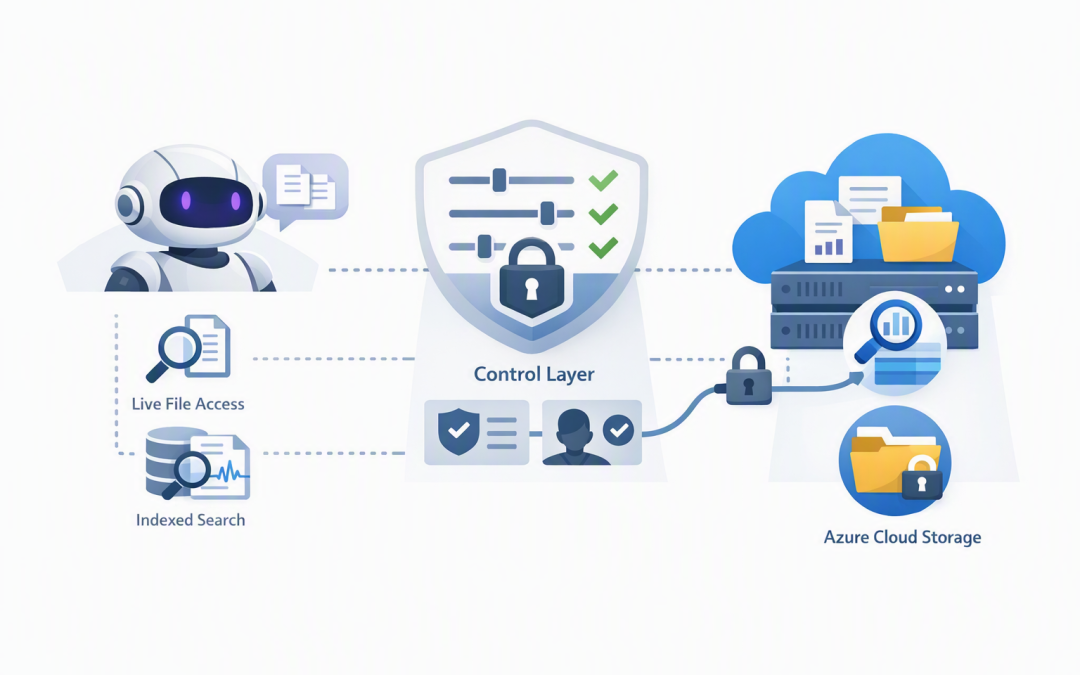
In this blog post Connecting OpenAI Agents to Azure Blob Storage and Cloud Data we will explain how to give an AI agent useful access to company information without handing it the keys to every file your business owns.


Many organisations already store policies, contracts, reports, project files and customer documents in the cloud. The problem is that employees still spend too much time searching folders, opening outdated files and asking colleagues where information lives.
An OpenAI agent can help, but it does not automatically understand your private cloud data. You need a controlled connection between the agent and services such as Azure Blob Storage, which is Microsoft’s cloud service for storing large collections of files and unstructured data.
What connecting an OpenAI agent to cloud data really means
An AI agent is a model that can answer questions and use approved tools to complete specific tasks. Those tools might search documents, read a file, query a business system or create a service ticket.
The agent should not receive a permanent storage key or unrestricted access to an entire Azure environment. Instead, your application provides a small set of controlled actions, such as “list approved policy files” or “read the latest contract template”.
This tool layer is the important part. It decides what the agent can access, checks the user’s permissions and records what happened.
A typical request works like this:
- An employee asks the agent a business question.
- The agent selects an approved search or file-reading tool.
- The application verifies the employee’s identity and permissions.
- Only the relevant file or document sections are retrieved.
- The model uses that information to prepare an answer.
- The request, file access and result are logged for review.
This is why production agents require more planning than a chatbot demonstration. Our guide to designing secure AI agent infrastructure on Azure covers the wider hosting, identity and network decisions.
Choose between live file access and document search
There are two main ways to connect an agent to Azure Blob Storage. Choosing the right one can significantly affect cost, speed and answer quality.
Option one is live access through a controlled tool
Live access is useful when the agent needs an exact, current file. For example, it may need to retrieve today’s export, inspect a specific customer document or confirm whether a report exists.
The agent calls a function in your application, and that function uses the Azure Storage software library to access the approved container. A container is simply a controlled area used to organise files inside a storage account.
This approach is straightforward and keeps information current. However, repeatedly opening large documents can be slow and expensive, so it is not the best option for searching thousands of files.
Option two is indexed search across many documents
For broad questions, Azure AI Search can extract and organise content from Blob Storage. The agent searches this index rather than reading every file individually.
This is commonly called retrieval-augmented generation, or RAG. In plain English, the system finds the most relevant sections of your private documents and gives only those sections to the model before it answers.
Indexed search works well for policies, procedures, product information, knowledge bases and technical documentation. It normally provides faster answers while reducing the amount of data sent to the model.
Many businesses use both patterns. Search handles general questions, while live tools retrieve exact files or recently updated operational information.
A simple C# connection to Azure Blob Storage
The following example shows the basic service behind two possible agent tools. One lists files from an approved folder, while the other reads a permitted text file.
It uses DefaultAzureCredential, which allows an Azure-hosted application to use its own managed identity. A managed identity is a secure application identity managed by Azure, removing the need to store usernames, passwords or storage keys in code.
using Azure.Identity;
using Azure.Storage.Blobs;
using Azure.Storage.Blobs.Models;

public sealed class BlobAgentTools
{
 private readonly BlobContainerClient _container;
 private const string ApprovedPrefix = "approved/";
 private const long MaximumFileSize = 1_000_000;

 public BlobAgentTools(string accountName, string containerName)
 {
 var containerUri = new Uri(
 $"https://{accountName}.blob.core.windows.net/{containerName}");

 _container = new BlobContainerClient(
 containerUri,
 new DefaultAzureCredential());
 }

 public async Task<IReadOnlyList<string>> ListFilesAsync(
 string prefix,
 CancellationToken cancellationToken)
 {
 var safePrefix = $"{ApprovedPrefix}{prefix.TrimStart('/')}";
 var files = new List<string>();

 await foreach (BlobItem item in _container.GetBlobsAsync(
 prefix: safePrefix,
 cancellationToken: cancellationToken))
 {
 files.Add;

 if (files.Count == 50)
 break;
 }

 return files;
 }

 public async Task<string> ReadTextFileAsync(
 string blobName,
 CancellationToken cancellationToken)
 {
 if (!blobName.StartsWith(
 ApprovedPrefix,
 StringComparison.OrdinalIgnoreCase))
 {
 throw new UnauthorizedAccessException(
 "The requested file is outside the approved location.");
 }

 BlobClient blob = _container.GetBlobClient(blobName);
 BlobProperties properties = await blob.GetPropertiesAsync(
 cancellationToken: cancellationToken);

 if (properties.ContentLength > MaximumFileSize)
 throw new InvalidOperationException("The file is too large.");

 BlobDownloadResult result = await blob.DownloadContentAsync(
 cancellationToken);

 return result.Content.ToString();
 }
}
These methods can be exposed to an OpenAI agent as function tools with names such as list_approved_files and read_approved_text_file. The descriptions given to the model should clearly explain when each tool may be used.
They can also be published through the Model Context Protocol, or MCP, which provides a standard way for AI applications to discover and call tools. Our practical guide to creating an MCP server in C# explains the starting point.
Security controls that should not be optional
The code is only the connection. A production system also needs controls that reduce the chance of accidental disclosure, misuse or an AI-generated action affecting the wrong data.
- Use managed identity: Give the agent application an Azure identity instead of placing storage account keys in configuration files.
- Grant minimum access: Assign read access only to the required container. Do not give the agent access to every storage account in the subscription.
- Separate reading from writing: Create different tools and approval rules for uploading, changing and deleting files. Most knowledge agents do not need delete access.
- Preserve user permissions: An employee should not receive information through the agent that they could not open directly.
- Limit the content sent to the model: Retrieve relevant document sections rather than transferring entire folders or containers.
- Use private network access where appropriate: Azure Private Endpoints allow the application to reach storage through a private network path rather than exposing storage publicly.
- Log every important action: Record the user, requested tool, document, result and time. Avoid placing sensitive document contents in general application logs.
- Treat documents as data: A malicious instruction hidden inside a file should not be allowed to override the agent’s security rules.
These controls also support the Essential 8, the Australian government’s cybersecurity framework used by many organisations as a security benchmark. Least-privilege administration, strong identity controls, application protection, patching and reliable backups still matter when AI is added.
If the agent needs long-term memory or a detailed evidence trail, consider a separate data store rather than mixing conversation history with business files. We cover that pattern in building audit-ready AI agents with Azure Cosmos DB.
A practical business scenario
Consider a 200-person professional services firm with policies, proposal templates and project documents spread across several Blob Storage containers. Staff regularly reuse outdated templates because finding the approved version takes too long.
A controlled agent could search indexed policies, identify the latest approved template and retrieve a specific project file only when the employee has access. Sensitive finance and human resources containers would remain outside the agent’s reach.
If 120 employees each save only 10 minutes per week, the business recovers 20 hours every week. The larger benefit may be avoiding an outdated contract clause, incorrect procedure or accidental disclosure.
Start with one valuable and controlled use case
Do not begin by connecting an agent to every cloud system. Choose one document collection, one employee group and a small number of read-only tools.
Measure search time, answer accuracy, user adoption, model costs and access failures. Expand only after the security rules and business value have been proven.
CloudProInc combines more than 20 years of enterprise IT experience with practical work across Azure, Microsoft 365, OpenAI, Microsoft Defender and Wiz. As a Microsoft Partner and Wiz Security Integrator based in Melbourne, we help organisations connect AI to useful business data without creating another uncontrolled information system.
If you are unsure how an OpenAI agent should access your Azure files, we are happy to review the proposed design and identify the security, cost and governance gaps before it reaches production — no strings attached.